
Opening a bank account online in Pakistan has become fast and simple. Thanks to digital banking apps and the State Bank of Pakistan’s digital push, you no longer need to stand in long queues or fill out paperwork.
Whether you are a student, freelancer, salaried person, or small business owner, you can now open a bank account online in Pakistan using just your mobile phone.
What Is a Digital Bank Account?
A digital bank account is an account you can open and manage through a mobile banking app or website. You can send and receive money, pay bills, use ATM services, and track transaction history — all without visiting a bank branch.
Who Can Open a Bank Account Online in Pakistan?
- Pakistani citizens with valid CNIC or Smart CNIC
- Students and salaried employees
- Freelancers and online earners
- Small business owners
- Overseas Pakistanis (selected banks)
Types of Bank Accounts You Can Open Online
1. Simple / Asaan Digital Account
- Best for daily use
- No minimum balance required
- Salary, bill payments, ATM withdrawals
- Easy approval
2. Savings Account
- Earn profit on saved money
- Safe place to grow savings
- Profit usually ranges between 10–18% annually (bank & policy dependent)
3. Business Account
- For freelancers, shops, startups
- Receive client payments
- Better transaction limits
- Business documents may be required
4. Joint / Family Account
- Two or more people can manage one account
- Useful for family expenses
- Each member has access
What Do You Need to Open a Bank Account Online?
For Simple / Savings Account
- CNIC or Smart CNIC
- Active mobile number (registered on CNIC)
- Smartphone with internet
- Selfie or biometric verification
For Business Account
- CNIC
- Business name & nature
- Proof of income or registration (if required)
Step-by-Step: How to Open a Bank Account Online in Pakistan
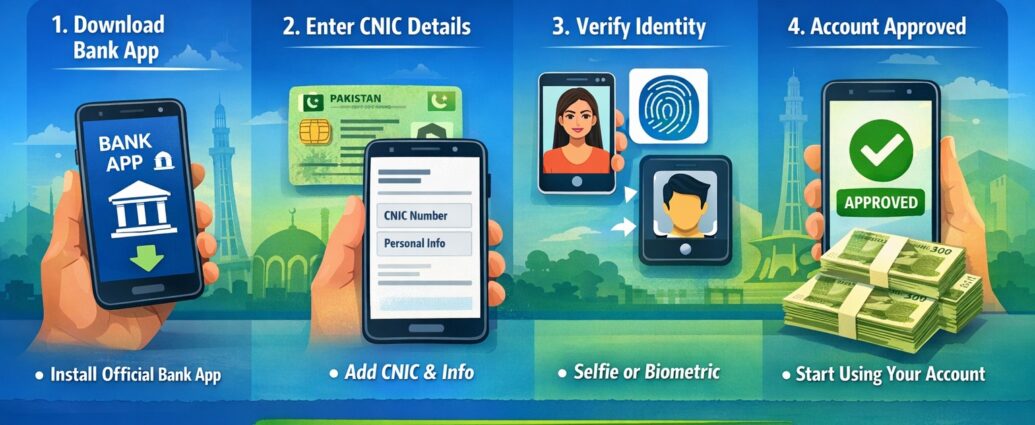
Step 1: Download Bank App
Choose a bank offering digital accounts and download its official mobile app.
Step 2: Enter CNIC Details
Add your CNIC number and personal information.
Step 3: Verification
Complete verification via:
- Biometric
- Selfie
- Video call (in some cases)
Step 4: Submit Application
Your account is usually approved within minutes or a few hours.
Step 5: Start Using Account
Send money, receive payments, pay bills, and use ATM services.
ATM Services – How Do They Work?
Even digital accounts provide ATM access.
ATM Benefits
- Cash withdrawal
- Balance inquiry
- Mini statement
- Card-based shopping
ATM Charges (Average)
- Same-bank ATM: Free or very low
- Other-bank ATM: Rs 20–35 per transaction
- ATM card annual fee: Depends on bank
Digital Banking App vs ATM – Which Is Better?
| Feature | Digital App | ATM |
|---|---|---|
| Money Transfer | ✅ Yes | ❌ No |
| Bill Payments | ✅ Yes | ❌ No |
| Cash Withdrawal | ❌ No | ✅ Yes |
| 24/7 Access | ✅ Yes | ✅ Yes |
👉 Best practice: Use apps for transactions, ATM for cash.
Savings Account – Profit & Benefits
- Earn monthly or yearly profit
- No risk compared to cash
- Automatic profit calculation
- Ideal for long-term savings
💡 Profit rates depend on:
- SBP policy
- Bank type
- Deposit amount
Why Transaction History Is Important
Strong transaction history helps you:
- Apply for loans
- Get credit cards
- Show income proof
- Improve financial credibility
- Support visa & tax documentation
Digital banking apps store clear, downloadable transaction records.
Main Benefits of Opening a Bank Account Online in Pakistan
- No branch visit
- Fast approval
- Secure transactions
- Full control via mobile app
- ATM access nationwide
- Ideal for Digital Pakistan users
Final Words
Digital banking is changing how Pakistan manages money. If you want convenience, safety, and speed, opening a bank account online in Pakistan is the smart choice. From daily expenses to long-term savings, digital accounts make banking simple for everyone.